How to Reduce No-Shows for Service Calls in Canada
Every missed service call costs more than a blank hour on the calendar. For a Canadian plumbing, HVAC, electrical, or fire-safety business, a single no-show can burn two to four billable hours once you add drive time, fuel, dispatch effort, and the next job that ran late because of it. Scale that across a fleet of five trucks and it is not hard to watch $2,000 to $5,000 CAD walk out the door in a single week.
The good news: no-shows are one of the most fixable leaks in a field service business. A few disciplined changes to how you book, confirm, and run your jobs can drop your no-show rate by 50% to 80%. This guide walks through what is actually causing missed service calls, and the specific steps Canadian trade owners can take this month to cut them down.
Why Customers No-Show on Service Appointments
Before you fix the problem, it helps to understand it. When we look at the reasons Canadian homeowners and facility managers miss service calls, almost all of them fall into five buckets:
- They forgot. The appointment was booked two weeks ago, nothing reminded them, and life got busy.
- They did not know when you were coming. A 4-hour or 8-hour arrival window feels impossible to plan around.
- The tech is running late and nobody told them. After 45 minutes of waiting, they leave for the school pickup or a work call.
- They booked with two companies. A classic move when a furnace quits in February and the first shop cannot come until Thursday.
- They changed their mind. The leak stopped on its own, the tenant moved out, or a neighbour lent them a generator.
Notice how many of these are communication problems, not customer problems. That is what makes them fixable.
Step 1: Measure Your Current No-Show Rate
You cannot reduce what you do not track. Before any tactics, pull 90 days of completed jobs and calculate your no-show rate: the percentage of confirmed appointments where the customer was not available when your technician arrived (or cancelled within 2 hours of the visit).
Industry benchmarks for Canadian field service businesses usually land between 8% and 15%. If you are above 10%, you have a meaningful revenue opportunity. If you are under 5%, you are likely already doing most of what follows.
Pro tip: Break the rate down by service type, technician, and booking source. You will almost always find the worst offenders clustered in one or two categories — that is where you start.
Step 2: Tighten Your Arrival Windows
The single biggest driver of Canadian service-call no-shows is the open-ended arrival window. Telling a customer “we’ll be there between 8 and 12” is asking them to cancel half their morning. Many will take the booking, then bail when something more certain comes up.
Move from half-day windows to 2-hour windows
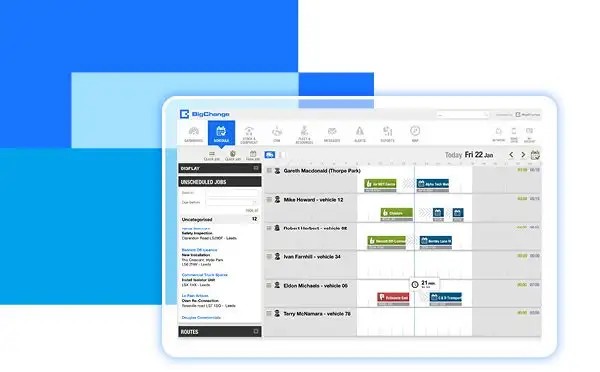
Modern scheduling software — including JobPerfect, which runs on BigChange — uses drive-time optimization and live technician location to tighten windows from 4 hours to 2, and often down to 60 minutes on the day of service. Customers are dramatically more likely to be home when they only need to hold a two-hour slot.
Send an ‘on my way’ notification with live ETA
When the technician finishes the previous job, the dispatcher (or the system automatically) fires off a text: “Your JobPerfect technician Marc is on his way — arriving in approximately 25 minutes.” Homeowners love it, and it cuts no-shows on the arrival leg almost to zero.
Step 3: Automate Your Reminder Sequence
Manual phone reminders do not scale, and they are usually the first thing to slip when a dispatcher is busy. Build an automated sequence that runs whether your office is slammed or empty:
- At booking: confirmation email with the date, window, technician’s name, and a one-click reschedule link.
- 48 hours before: SMS reminder asking the customer to reply YES to confirm or RESCHEDULE to move it.
- Morning of: SMS with the refined arrival window and any prep notes (e.g., “please clear the area around your electrical panel”).
- 30 minutes before arrival: ‘on my way’ SMS with live ETA and technician photo.
In practice, shops that move from ad-hoc phone calls to this four-touch automated sequence see no-show rates fall by 40% to 70% in the first month. Text messages in particular have open rates above 95% in Canada, compared with roughly 20% for email.
Step 4: Require a Deposit for High-Risk Jobs
Not every customer earns the same trust level. For higher-risk categories — same-week bookings from new customers, after-hours emergency calls, or jobs above a certain dollar value — consider a small refundable deposit at booking ($49 to $99 CAD is typical).
A deposit does three things at once: it filters out tire-kickers, it creates psychological commitment, and it lets you recoup a portion of your drive time if the customer still no-shows. Most provincial consumer protection rules allow refundable deposits of this size on service appointments as long as your cancellation and refund policy is clearly disclosed — check your province’s rules (for example, the Consumer Protection Act in Ontario or the Business Practices and Consumer Protection Act in B.C.) before rolling one out.
Step 5: Make Rescheduling Easier Than Ghosting
A lot of no-shows happen because customers do not want to call the office to cancel — it feels awkward, they expect to be on hold, and they know they will be pressured to rebook.
Fix this by giving them a one-tap alternative. In your SMS reminders, include a link that lets them reschedule themselves into the next available slot. You will see some customers use it, and that is a win — a rescheduled job is infinitely more valuable than a missed one, because you can fill the original slot with another booking.
Step 6: Charge (Fairly) for No-Shows
A no-show fee is a tool, not a punishment. The goal is to set an expectation at booking that your time is valuable and confirmed appointments are a two-way commitment. Typical Canadian trade no-show fees range from $75 to $150 CAD, generally collected only after the first offence and only when the fee was disclosed in writing at booking.
Two rules to keep this from backfiring: waive the fee the first time if the customer reschedules in good faith, and never charge a fee the customer did not explicitly agree to. Disclosed, reasonable, and consistently applied — that is what keeps the policy defensible and your Google reviews healthy.
Step 7: Use Scheduling Software Built for Trades
Most of the tactics above are hard to run well out of a spreadsheet or a paper calendar. Dedicated job scheduling software does the heavy lifting: automated reminders, live dispatch boards, two-hour arrival windows, on-my-way notifications, deposit collection, and no-show tracking all in one system.
Canadian trade-business owners who are still on Excel or a whiteboard should read our guide on moving from Excel to job scheduling software. If you run trucks, JobPerfect’s fleet management system also cuts no-show impact by giving dispatchers live vehicle location so they can re-route in real time when a job runs long.
Specialty trades get the biggest lift from tools tailored to their workflow — see our electrical contractor software and door repair job management software for trade-specific features.
Step 8: Train Your Office Team on the First 30 Seconds
The booking call itself is where a lot of no-shows are created. Train your CSRs to do three things on every call:
- Get the best mobile number for SMS reminders (not a landline).
- Confirm the arrival window out loud and ask the customer to write it down.
- Read back the cancellation and no-show policy in one sentence — not legalese, just: “If something comes up, text us at this number and we’ll move it for free. If we show up and nobody’s home, there’s a $95 trip fee.”
That 15-second script does more than any back-end system to reset customer behaviour.
Putting It All Together: A 30-Day Rollout Plan
You do not need to do everything at once. Here is a realistic sequence for a Canadian shop with 3 to 15 trucks:
- Week 1: Measure your current no-show rate. Write down the number.
- Week 2: Turn on automated SMS reminders (48-hour, morning-of, on-the-way).
- Week 3: Tighten your arrival windows to 2 hours and update your booking scripts.
- Week 4: Add a clearly disclosed no-show fee and self-serve reschedule link.
Most owners see their no-show rate cut roughly in half within 30 days of running this playbook, and the remaining reductions come in the following 60 days as the new habits stick.
See How JobPerfect Cuts No-Shows Automatically
JobPerfect is built for Canadian trade businesses — plumbing, HVAC, electrical, fire safety, and dock door repair. Two-hour arrival windows, automated SMS reminders, live dispatch, and built-in deposit collection are included out of the box. Book a free demo at jobperfect.ca and we’ll show you — using your own numbers — what reducing no-shows by 50% would add to your bottom line this year.
Frequently Asked Questions
What is a good no-show rate for a field service business?
For Canadian residential trades, anything under 5% is strong, 5–10% is average, and above 10% is a clear sign your reminder and scheduling systems need work. Commercial and facility-management accounts tend to run lower, typically 2–6%.
Can I legally charge a no-show fee in Canada?
Yes, provided the fee is reasonable and clearly disclosed to the customer before the appointment is booked. Each province has its own consumer protection legislation (for example, Ontario’s Consumer Protection Act or B.C.’s Business Practices and Consumer Protection Act), but in general a disclosed trip fee of $75 to $150 CAD is enforceable. Put it in your booking confirmation and on your website.
Do SMS reminders really work better than phone calls?
In most cases, yes. Text messages have open rates above 95% and response rates around 45% in Canada — far higher than voicemails, which often go unheard for 24 hours or more. Phone calls are still useful for high-value or complex appointments, but the bulk of your reminders should be automated SMS.
How much does scheduling software cost for a small Canadian trade business?
Pricing varies, but most purpose-built systems — including JobPerfect — run between $60 and $150 CAD per technician per month, with volume discounts as your fleet grows. For a typical 5-truck shop, the software usually pays for itself within the first month from reduced no-shows alone.
What is the fastest single change I can make to reduce no-shows this week?
Turn on an automated SMS reminder 24 hours before every appointment, with a simple “Reply YES to confirm or RESCHEDULE to move it” prompt. Shops that do only this — nothing else — typically cut no-shows by 25% to 40% within two weeks.
Related reading: How much are missed calls costing your trades business? | AI receptionist for plumbers and HVAC companies in Canada