How to move from Excel to job scheduling software

Are you using Excel to manage your job schedules? It’s a common choice for many field service businesses. But, have you ever thought there might be an easier way?
This blog is all about making the switch from Excel to job scheduling software. We’ll look at why it’s a smart move and how it can make your work life a lot easier.
Let’s dive in and see how this change can benefit your business.
Why spreadsheets like Excel might not be enough for job scheduling
Ever found yourself tangled in a web of Excel sheets? It happens a lot, especially in the busy world of field services. Excel is a handy tool, but when it comes to scheduling jobs, it can sometimes fall short.
Let’s break it down:
Keeping up with changes
Excel can be a headache when you need to update schedules. If a job time changes or a new job comes in, it’s a juggle to rearrange everything.
Say you need to change a job time or slot unexpectedly. With Excel, this means manually updating everything, which can be time-consuming and frustrating. You risk creating scheduling conflicts or overlooking important updates, or something can even get accidentally deleted or overwritten without you realising it.
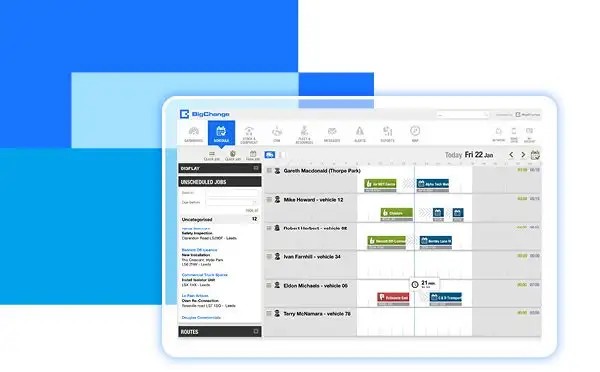
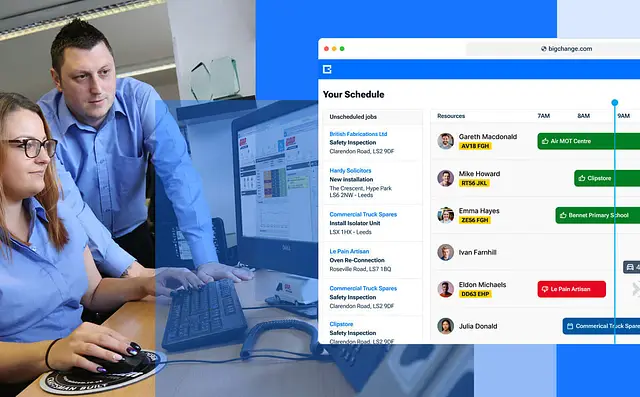
This is where job scheduling software shines. It allows for quick, hassle-free updates. Imagine dragging and dropping jobs to new times or days, and the software automatically adjusting the rest of your schedule. It’s that simple.
Access and conflicted copies
Sharing an Excel schedule often means sending it back and forth via email. This can lead to confusion: Who has the latest version? Did everyone get the update about the changed job time?
Job scheduling software offers a more streamlined approach. It’s usually cloud-based, meaning your team can access the latest schedule anytime, anywhere (even on a mobile app). Which means, no more email chaos, just one up-to-date schedule that everyone can see and rely on.
Mistakes and mix-ups
With Excel, it’s easy to make mistakes. A wrong entry here, an outdated version there—and suddenly, your schedule’s a mess. These mistakes not only cost time but can also lead to unhappy customers and stressed-out staff.
Job scheduling software, with features like automated alerts and conflict warnings, helps reduce these errors. It ensures that your schedules are accurate and reliable, which means less stress for you and better service for your customers.
Bottom line: Excel has been a faithful companion to many businesses, but as your needs change, it’s worth considering a switch to job scheduling software. This move could streamline your scheduling process, reduce errors, and ultimately save you time and money. You can find out more about job scheduling software in our complete guide, or keep reading for the benefits.
The benefits of switching to job scheduling software

So, you’ve seen the struggles with Excel. Now, let’s talk about the good stuff—job scheduling software.
Here’s what you gain by making the switch:
Easy to use with one version of the truth
One of the biggest draws of job scheduling software is its ease of use. Unlike Excel, software like BigChange is built specifically for scheduling, meaning they’re intuitively designed to handle changes and adjustments with ease.
Like being able to drag-and-drop jobs to reschedule them, or automatically notifying your team of any changes in real-time. This level of simplicity and efficiency can save you hours every week, not to mention the reduced risk of errors. Software like BigChange can save you time and keep everyone in the loop with zero fuss.
Access anywhere, anytime
In field services, being able to access your schedule no matter where you are is crucial. Most job scheduling software is cloud-based, allowing you and your team to view and update schedules from any device, be it a computer in the office or a smartphone in the field.
This means you can respond to changes as they happen, keeping your business agile and your customers happy. This flexibility can keep your team connected and efficient, no matter where they are.
Fewer mistakes, more accuracy
The automated features of job scheduling software make it less prone to human error compared to Excel. With features like conflict alerts and automatic updates, the chances of double-booking or overlooking a job are greatly reduced.
This accuracy is vital in maintaining a smooth operation and building trust with your clients. When they see that your business runs like clockwork, they’re more likely to come back and recommend you to others.
Room for growth
As your business grows, Excel can struggle to keep up. Job scheduling software scales with you, handling more jobs without a hitch. This scalability means you won’t outgrow your scheduling system (if you choose the right tech)—it’ll evolve right alongside your business, supporting your growth every step of the way.
The right tech supports your business growth, making sure you’re always ready for more work.
Switching from Excel to job scheduling software
Alright, you’re convinced that job scheduling software is the way to go. But how do you start? Don’t worry, it’s not as daunting as it might seem.
Here’s a simple guide to get you and your team ready for the switch:
Step 1: Check what you need
First things first, take a good look at your current scheduling process. What works? What doesn’t? This will help you pick the right software.
Think about what specific features your business requires? Perhaps you need something that supports multiple users simultaneously, or maybe mobile access is crucial for your team in the field. At the same time, think about which features are must-haves and which are nice-to-haves—this will help you to see which items are deal-breakers when it comes to reviewing suppliers.
Step 2: Get your team on board
Change can be tricky, but it’s easier when everyone’s in the loop. Talk to your team about the switch and how it’ll make their jobs easier.
Explain how the new software will make their work easier and more efficient. Be open about the changes and encourage questions. This approach helps in easing any concerns and gets everyone on the same page.
Step 3: Plan the move
A smooth switch doesn’t happen by chance. It needs a bit of planning. Think about when and how you’ll make the move.
Decide on a ‘go-live’ date and work backwards to create a timeline. This might include time for setting up the software, transferring data from Excel, and training your team. Remember, a well-thought-out plan is key to a seamless switch.
Step 4: Train your staff
New software means new skills. Set aside some time for training your team. It’ll pay off in the long run. Make sure your team feels comfortable and confident with the new software before the switch. Consider different training methods like online tutorials, in-person sessions etc.
Well-trained staff will be more efficient and make the most out of the new system from day one.
Choosing your job scheduling software
So, you’re ready to say goodbye to Excel and hello to job scheduling software. But picking the right software can feel a bit overwhelming. Don’t worry, we’re here to help guide you through this important choice.
Here are the top considerations to think about:
#1: Matching your needs
First up, think back to the needs you listed earlier. What features are a must-have for your business? Maybe it’s something as simple as an easy-to-view calendar, or maybe you need more advanced features like real-time updates or mobile access. Keep your list handy when you’re comparing different software options.
#2: User-friendly design
Let’s be honest, nobody wants to spend hours figuring out how to use a new tool. The best job scheduling software is easy to understand and use.
Look for a clean, intuitive design. If you can, get a demo. It’s the best way to get a feel for how the software works. Remember, if it’s not user-friendly, it’s not going to help much.
#3: Reliable support and training
Even the best software can have hiccups. That’s why reliable customer support is crucial. Check what kind of help and training the software company offers. Do they have a helpful customer service team? Do they provide training materials or tutorials? Good support can make a world of difference, especially when you’re just starting out with a new tool.
#4: Reviews and recommendations
Finally, don’t forget to do a bit of homework (or just check out this blog where we’ve done it for you.) Look for reviews and ask for recommendations. Hearing from businesses similar to yours can be really insightful. They can tell you about their experiences, both good and bad. It’s a great way to get an honest view of the software’s strengths and weaknesses.
And there you have it. By focusing on your needs, looking for user-friendly design, checking for reliable support, and researching reviews, you’ll be well on your way to finding the perfect job scheduling software for your business.
Move to the future with job scheduling software
Moving from Excel to dedicated job scheduling software is a change that promises not just to improve your scheduling process but also to enhance the overall efficiency and productivity of your business.
Making the switch to job scheduling software is not just about leaving behind the limitations of Excel; it’s about embracing a future where your scheduling is more streamlined, your team is more connected, and your business operations are more efficient. It’s a smarter way of working.
Remember, the right job scheduling software can help you avoid common mistakes, keep your team on the same page, and give you the flexibility to manage your schedules from anywhere.
Call us on 2897880300 or email info@jobperfect.ca for a free demo!
Related reading: The JobPerfect AI Dashboard | How much are missed calls costing your trades business?